
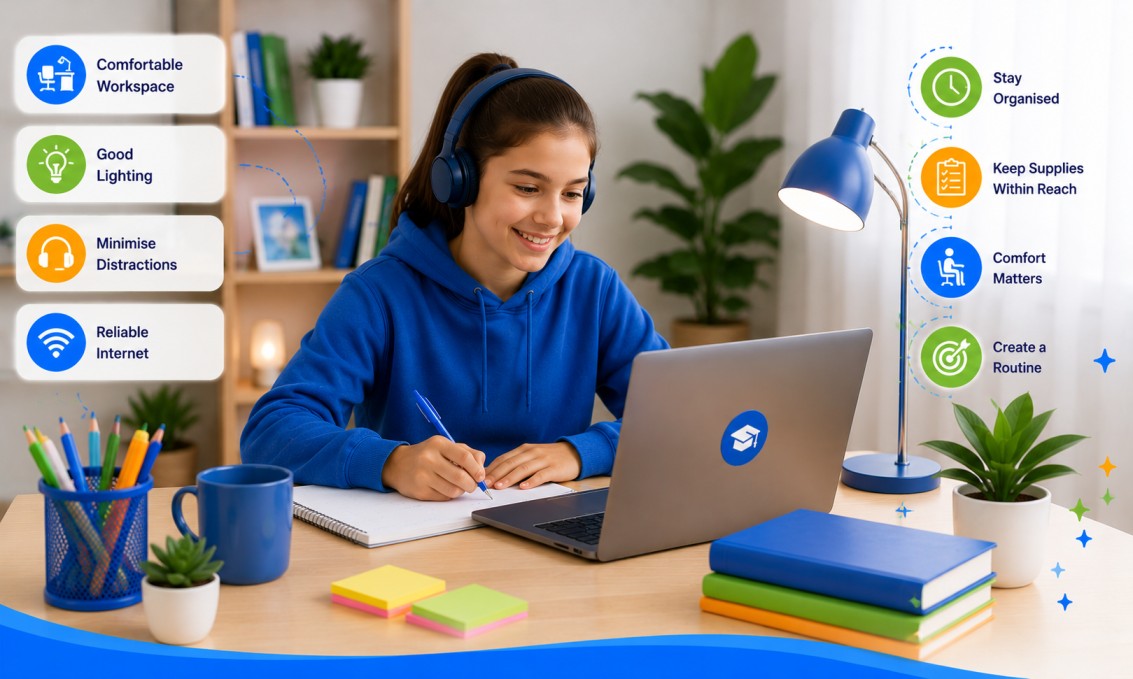
When a child logs into an online tutoring session from the kitchen table with the television on in the background, it is hard for them to focus, and even harder for a tutor to teach effectively. The good news is that a productive home learning space does not require a spare room or expensive furniture. It simply needs the right location, a few practical tools and a routine the whole family can stick to.
Why a Dedicated Learning Space Matters
Children learn best when their brain associates a specific space with focus and effort. A consistent learning spot, even a small one, signals to a child that it is time to concentrate, in the same way a bedroom signals it is time to sleep. For online tutoring specifically, a stable setup also reduces technical hiccups and helps the tutor build a clear picture of how the student is progressing, since they are not distracted by noise, poor lighting or a wobbly internet connection.
A dedicated space also helps parents. Once the space and routine are established, there is less friction each week getting a child ready for their lesson, and less back and forth about where to sit or what device to use.
Choosing the Right Location
You do not need a home office. What matters most is consistency and quiet.
Look for these features
- A spot away from television, siblings and household traffic
- Reasonable natural light or good overhead lighting
- A power point nearby so devices do not run out of battery mid lesson
- Strong Wi Fi signal, checked in advance rather than assumed
- Enough bench or desk space for a laptop, notebook and any textbooks
A section of the dining table used only during lesson times can work just as well as a study nook, provided the same spot is used for every session. If your home is busy in the afternoons, even a corner of a bedroom with a door that closes can be enough.
Essential Equipment for Online Tutoring
Good equipment does not need to be expensive, but a few basics make a real difference to how much a child gets out of each session.
Technology essentials
- A laptop or tablet with a working camera and microphone
- Headphones, which reduce background noise and help younger students concentrate on the tutor’s voice
- A charger kept permanently at the learning spot
- A second screen or printed worksheet area if the subject involves a lot of working out, which is common in maths
Physical study supplies
- Pens, pencils, an eraser and a ruler
- A notebook or exercise book dedicated to tutoring sessions, so progress is easy to track over time
- Scrap paper for working out problems, particularly useful for maths where students need room to show their steps
- A small whiteboard, which many students find helpful for practising working out before writing a final answer
Keeping these items in a single container or drawer near the learning space means less time searching for a ruler and more time actually learning.
| Quick tip Store all tutoring supplies in one container near the learning space so lessons can start on time, every time. |
Minimising Distractions
Distraction is the single biggest barrier to a productive online tutoring session. A few simple habits go a long way.
Before the session
- Turn off the television and put other devices on silent or out of reach
- Let other family members know a lesson is starting
- Have a glass of water ready so there is no need to get up midway through
During the session
- Keep the session tab or app open in full screen to avoid the temptation of other browser tabs
- Encourage your child to ask questions rather than staying quiet if they do not understand, since tutors can only help with what they can see and hear
Even in a shared household, ten to fifteen minutes of preparation before each lesson can prevent most interruptions.
Lighting, Comfort and Ergonomics
A child who is uncomfortable will struggle to concentrate, regardless of how good the lesson content is.
- Position the desk so light comes from the side rather than directly behind the screen, which causes glare
- Use a chair that supports the back, and adjust the desk or chair height so elbows rest comfortably at typing height
- Keep the screen at eye level where possible to reduce neck strain during longer sessions
- Take a short break between the tutoring session and homework or screen based activities that follow, especially for younger students
These small adjustments matter more over a school term than they might seem to on any single day, since posture and comfort affect attention span cumulatively.
Creating a Routine That Supports the Space
The physical space is only half the equation. Pairing it with a predictable routine helps children arrive ready to learn rather than rushed or distracted.
- Set up the space five to ten minutes before the lesson starts, rather than scrambling at the last minute
- Keep tutoring sessions at the same time each week where possible, since predictability builds momentum
- Have your child briefly look over the previous session’s notes before a new lesson begins
- Encourage a short wrap up after each session, jotting down what was covered and what to revisit
Over a term, these habits compound. A student who begins each lesson calm, prepared and in a familiar space is far better placed to absorb new maths concepts than one who is still settling in when the tutor begins.
Conclusion
A productive home learning space is less about equipment and more about consistency. Choose a quiet spot, keep the essentials on hand, remove obvious distractions and pair the space with a steady weekly routine. Do this, and your child will get noticeably more out of every online tutoring session, whether they are working through NAPLAN preparation, building foundations in primary school maths or tackling senior maths in the lead up to their HSC, VCE, QCE or other state based assessments. At Mastering Maths Online, our online maths tutors work with families across every Australian state and territory, and we are always happy to share simple, practical suggestions tailored to your child’s year level and learning style.
Frequently Asked Questions
You only need enough room for a laptop, notebook and a few study supplies. A quiet corner of a dining table or a small desk in a bedroom is enough, as long as it is used consistently for every session.
A stable connection of at least 10 to 20 Mbps is generally sufficient for video based tutoring. If possible, connect via Wi Fi close to the router or use an Ethernet cable to avoid dropouts during lessons.
Younger children usually benefit from a learning space closer to a parent, with more visual supplies like a whiteboard, while teenagers often do well with a quieter, more private spot where they can focus independently.
Headphones make the biggest difference, since they help the student hear the tutor clearly and reduce distraction from household noise. Choosing a room away from shared living areas also helps.
Signs it is working include your child settling into lessons quickly, fewer technical interruptions and steady improvement noted in progress reports. If lessons regularly start late or your child seems distracted, it is worth reviewing the location or routine.